

The dink.one Club & Facility Manual
Everything in the operator console, in the order you will use it.
This is the long version, written for anyone about to run a club or a facility here — whether you are starting from nothing or already running one elsewhere and deciding whether to move it. It is organised the way the console is rather than as a timeline, because running a club is not a project with an end — the calendar refills, members join and lapse, and you go back to the same five screens every week. If you want the short version instead, the organizer guide covers the first afternoon.
Print or save as PDF from your browser — the layout is set up for it. Or just send the link; it stays current, which a PDF in someone's downloads folder does not.
Part 1
Before you start
One decision about what you are actually setting up, and a short list of things to have to hand.
Club, facility, or both
These are two different things and most operators eventually run both. A club is a group of people. A facility is a place with courts in it. They share one console, one Stripe account and one member list, so running both is not twice the work — but the console shows you different screens depending on which you opened, and that catches people out.
If you are not sure, start with whichever you actually have. You can add the other later without moving anything.
- Club — people. Members, memberships, join requests, a public page, a shared identity. No courts of its own.
- Facility — a place. Courts, hours, pricing, bookings, specials, a map listing people can find.
- Both — the usual end state. Your club plays at your facility, members get facility benefits, and the money lands in one account.
- Group — a lighter club for a regular crowd that does not need memberships or dues. Same console, fewer screens.
What to have ready
Rough is fine. Everything here can be changed before anything goes public, and nothing on this list blocks you from looking around first.
- Your member list, in whatever state it is in. A spreadsheet with names and emails is enough.
- Where you play and how many courts. Surface, indoor or out, lights or not.
- What you charge for what, and whether you already take card payments.
- What is already in the diary for the next month.
Part 2
Setting up
An afternoon of configuration you do once. The console is wide, so it is worth twenty minutes learning its shape before you start filling it in.
Create it
Create the club or facility, name it, and you land on the console. Nothing is public yet and no money can move yet — you have to publish a page and connect Stripe deliberately, and neither happens as a side effect of setting something else up.
That is worth knowing because it means you can build the whole thing — courts, pricing, members, a season — and look at it before a single person sees it.
The shape of the console
Everything lives in one sidebar, grouped five ways. Learn the groups rather than the screens: there are a lot of screens, but you will only ever be looking for one of five kinds of thing.
It is a workbench, not an app — a sidebar on a laptop rather than a bottom bar on a phone. That is deliberate. Most of this work happens sitting down, and the parts that happen courtside have their own phone-sized screens.
- Operations — the things that happen. Scheduling, events, programs, scoring, matches and integrity, specials.
- People — members, memberships, join requests, coaches.
- Insights — standings, analytics, and the intelligence screen for a facility.
- Outreach — your share tools, marketing, and the inbox where members reach you.
- Admin — reports, setup, billing.
Setting up a facility
This is the one long form in the whole product, and it is long because a facility genuinely has that many facts about it. It is tabbed, it saves as you go, and there is a checklist at the top telling you what is still missing — so you can do it in three sittings rather than one.
There is also a guided wizard that walks the pricing chain in order. Use it the first time. The tabs are faster once you know what is where, but pricing depends on court classes which depend on time periods, and discovering that halfway through is how people end up redoing it.
- Courts — how many, what surface, indoor or outdoor, lights.
- Classes — group courts that share a price. Championship courts cost more than the far ones by the fence, and this is how you say so.
- Time periods — peak, off-peak, whatever your day actually looks like.
- Pricing — a rate per class per period, plus member and non-member rates.
- Hours — when you are open, including the exceptions.
- Policies — cancellation, refunds, waivers, house rules. Write these now; you will be quoting them later.
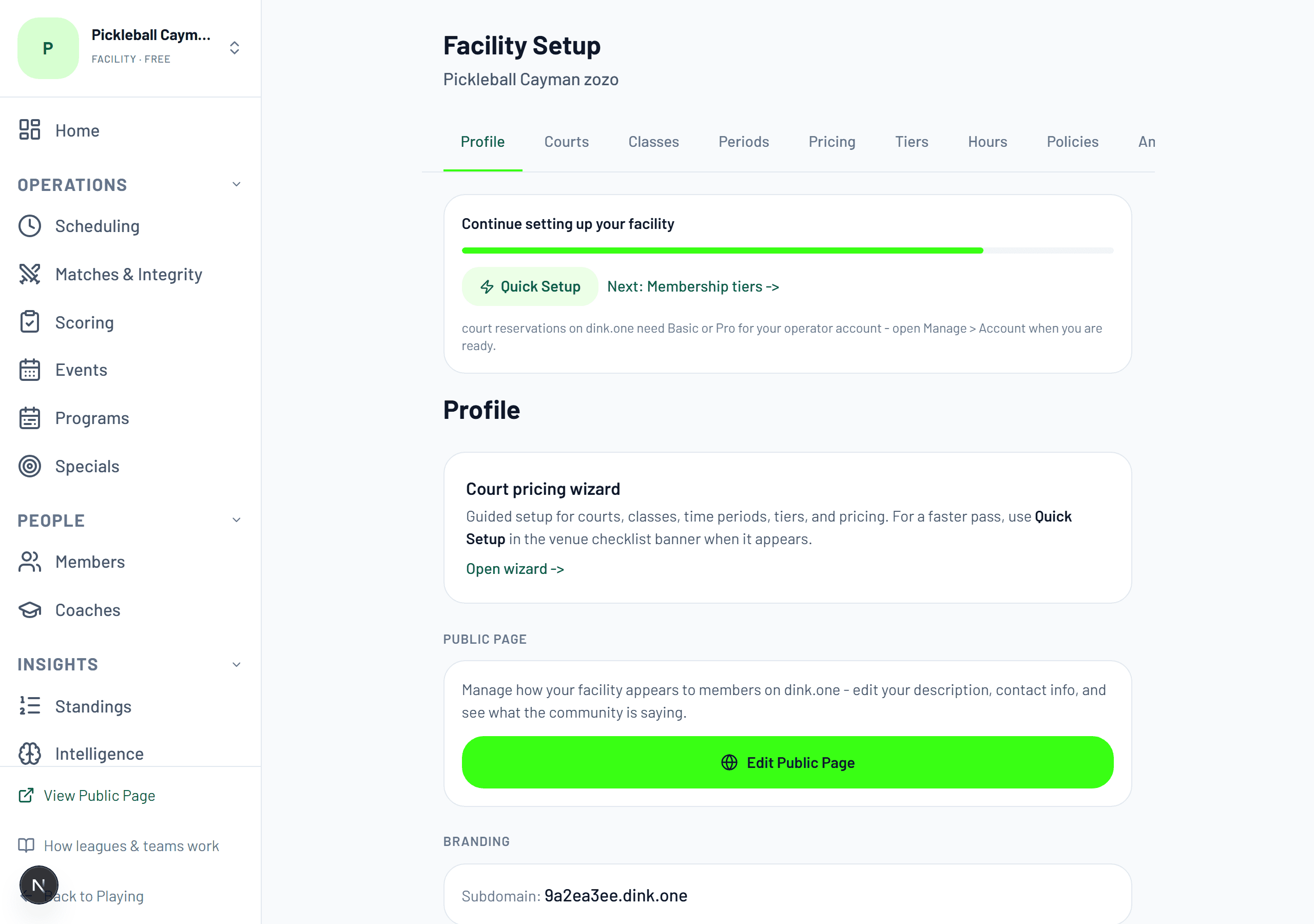
Your public page
Every club and facility gets a public page: who you are, where you are, what is coming up, who plays there. It is what a stranger finds when they search for somewhere to play near them, and it is the page your own members land on when someone shares your link.
Fill in the description and the photo before you publish. A page with a blank description still works and still ranks, but it converts like a blank description — which is to say, it does not.
Part 3
Your people
The members are the reason any of the rest of it matters. Getting them in is the step most operators underestimate.
Getting members in
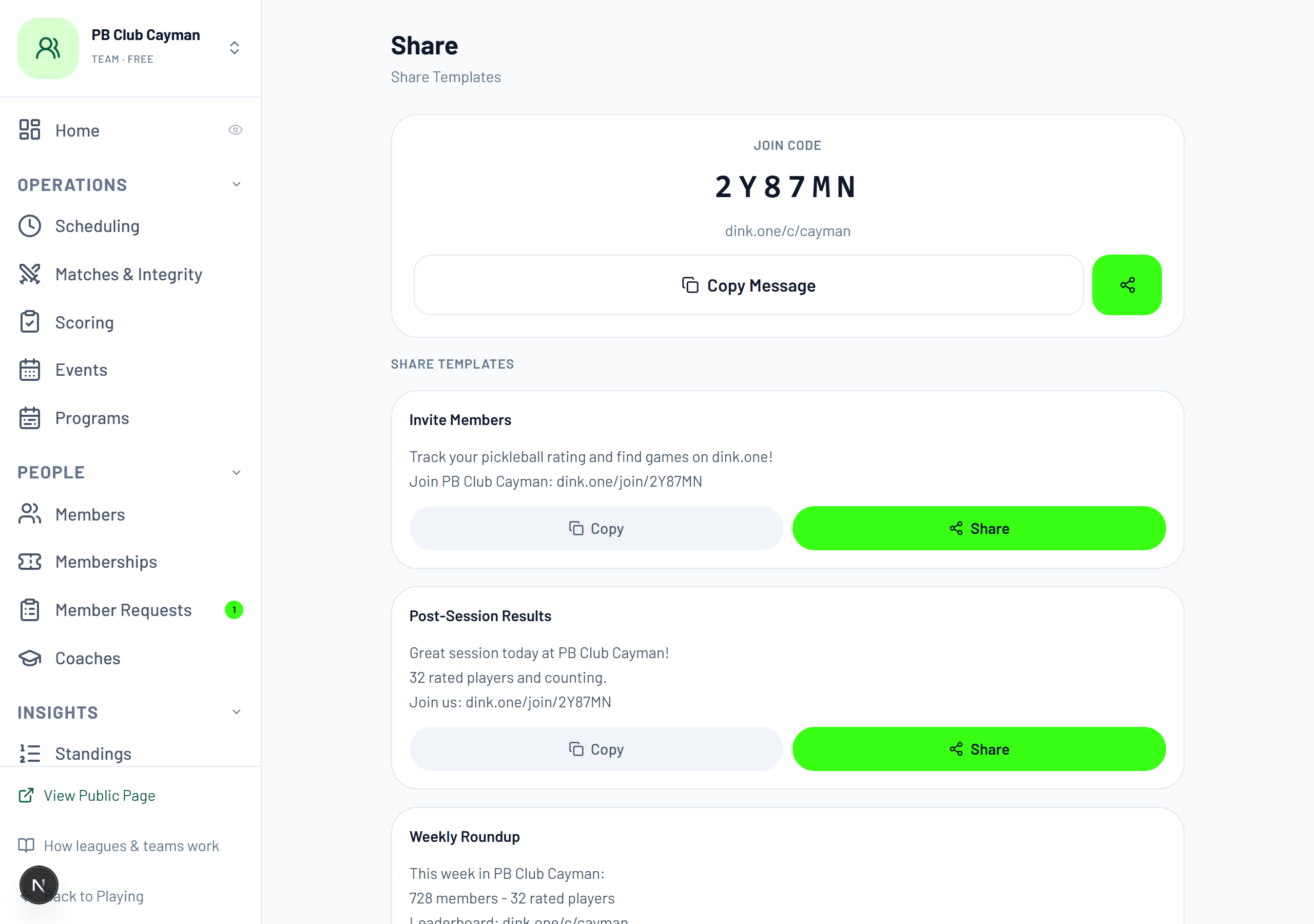
Four routes in, and you will use more than one. The share screen gives you a join code, a link, and pre-written messages you can paste into whatever group chat your club already lives in.
Be realistic about the rate. Some of your people will join the week you ask; some will join the week they need to book something. Import the list anyway — an imported member who has not signed up yet still appears in your roster, still gets counted, and still has somewhere to land when they do.
- A join link and a six-character code. The lowest-friction route and the one most people use.
- Import a spreadsheet. Names and emails is enough; anything else you have is a bonus.
- Claim a member you have already added, so their history is waiting when they sign up.
- Join requests, if you would rather approve people than let anyone in.
Members who have not signed up yet
You can add someone who has no account. They show as a placeholder, they can be put on a roster, and results can be recorded against them. When they eventually sign up they claim the placeholder and inherit everything already attached to it.
This is what stops your club being a ghost town on day one. You do not have to wait for 200 people to sign up before your roster looks real — you import the roster, and it fills in behind you.
Memberships and tiers
Optional, and off by default. Turn tiers on and you can offer free or paid levels with benefits attached — a member rate on court bookings, a discount on your events, whatever you already do informally.
The honest advice is not to start here. Get people in, run something, see who actually turns up, then decide what a membership is worth. A tier structure designed before you have members is a guess with pricing attached.
Staff and what they can see
You can hand someone a specific job without handing them the whole console. Each capability is separate, so the person entering scores on a Tuesday never sees your Stripe balance and the person on the desk never sees your analytics.
Give scoring away first. It is the job that has to happen on the night, on a phone, at the side of a court — and the person best placed to do it is almost never you.
- Scoring — enter and confirm results, and use the event-day screens.
- Check-in — scan people in and see who is expected.
- Members — add, edit and organise the roster.
- Money — billing and payouts. Give this one out last and to the fewest people.
Part 4
The money
What you collect lands in your own account. We are not a middleman holding your takings — we take a percentage at the moment of the charge and the rest is yours.
Connecting Stripe
Connect once, from Billing. You do it in Stripe rather than here, and we never see your bank details. One connected account covers every club, facility and league you manage — it is priced per operator, not per entity, so a second facility costs nothing extra.
You can set prices before verification finishes. A paid tier saved early is held as a draft and switches itself on when Stripe confirms, so you are not blocked waiting on a bank.
What it costs
You can run a real club on a free account. Only two things are held behind a paid plan — bookable court reservations, and private groups that stay out of public listings. Every other screen in this manual works on Free.
So the plan decision is usually about volume rather than features. Going from 10% to 3% saves $70 on every $1,000 you collect, which puts the break-even for Basic somewhere around $290 a month collected through us. Work it out on your own numbers before you upgrade.
- Free — no monthly fee, we take 10% of what you collect through us.
- Basic — $20 a month, our cut drops to 3%. Unlocks bookable reservations.
- Pro — $100 a month, our cut drops to 1%.
- Stripe's processing fees are separate and go to Stripe. We quote our share on its own rather than folding them together, because an all-in number would be wrong the moment Stripe changes its fees.
Money on registrations
An event can be free, paid, or paid with exceptions. You can comp individual people, record someone who paid you in cash so your numbers reconcile, and take payment at the door rather than up front. The list of who has paid sits next to the list of who is registered, because they are not the same list and treating them as one is how an event ends up short.
Removing someone from a paid event asks what should happen to their money — refund, credit, or nothing — rather than assuming. That is one extra click and it prevents the most common support message an organizer gets.
Credits and gift certificates
You can hold a balance for a member and you can sell gift certificates. Both are more useful than they sound, and for the same reason: they give you a way to make someone whole without putting money back on a card.
A rained-off session refunded as credit keeps the money in your club and keeps the member. A rained-off session refunded to a card is a refund fee and a person who now has to decide again whether to come back.
Part 5
The calendar
Four different things can occupy a slot, and knowing which one you want saves a lot of undoing.
Events
An event is anything with a start time that people sign up for — a social, a clinic, a tournament, or an entire league season. One list holds all of them with the status on the row, so a draft you have not published, a season in progress and last month's tournament are visible together rather than in three places.
The lifecycle is deliberately three-way rather than a delete button. Archive keeps the record and takes it off the list. Cancel tells the registered people it is off and deals with their money. Delete is for the one you created by mistake thirty seconds ago. Picking the wrong one is recoverable; being offered only "delete" would not be.
Programs
A program groups several independent events under one window and one public page. A summer of clinics, a spring season plus its playoff, a beginners' block of six weeks — one link to share instead of six.
The events stay independent underneath. Someone can register for one clinic without registering for the block, and cancelling one does not touch the others. The program is a wrapper for discovery, not a bundle you have to buy whole.
Court time
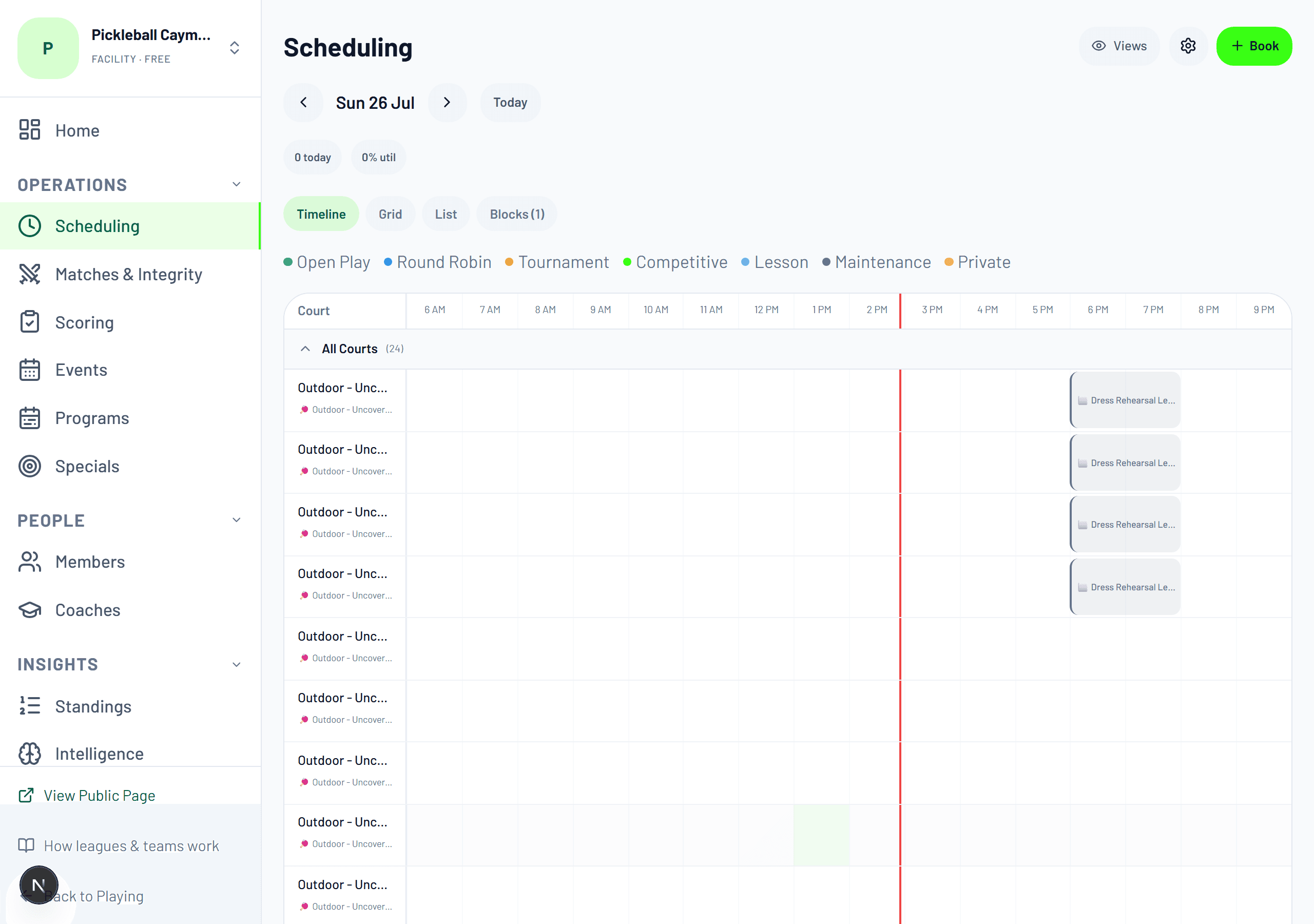
The scheduling screen is the facility operator's home. A day at a glance across every court, colour-coded by what kind of use it is — open play, round robin, tournament, competitive, lesson, maintenance, private — with utilisation on the same screen so you can see the holes.
You can block time without taking a booking. Resurfacing, a private hire that came in by phone, a coach's standing lesson — put it on the grid so nothing else lands on top of it, and so the utilisation number tells you the truth.
Letting members book themselves is the paid part. Everything else on this screen — seeing the day, blocking time, recording a booking you took by phone — works on a free account.
Specials
A special is a targeted offer on court time — a discount, an off-peak rate, a promotion for a quiet Tuesday. They have their own lifecycle of draft, active, paused and expired, so you can build one now and switch it on when you need it.
The honest use for these is the empty afternoon. You already know which slots do not sell; a special is how you say so publicly without permanently dropping your rate.
Part 6
Event day
The one part of this that happens standing up. It has its own screens for that reason.
Before the door opens
Check the roster against who has paid, and send one message to the registered list. Most event-day problems are actually the previous evening's problems that nobody looked at.
If someone is running the desk who is not you, give them the check-in capability now rather than at the door. Handing over access while twelve people wait is not the moment to discover you needed a different toggle.
Check-in
Everyone registered gets a QR code. Scan it, or tap the name on the list — both work, and the list is the fallback for the person whose phone is dead, which there is always one of.
Checking in is what makes the difference between who signed up and who actually came. That distinction drives the roster you play with, the results you record, and the attendance figure you look at afterwards when deciding whether to run it again.
Scoring on the night
The event-day screens are sized for a phone held in one hand at the side of a court: scores, schedule, check-in and roster, nothing else. Not the sidebar console shrunk down — a different screen for a different posture.
Results entered here flow straight to standings and to the players' ratings. Which is the actual reason people come back: the game they played on a Tuesday counted for something.
When it goes wrong
Four things go wrong on event day, always the same four. All of them are two taps, and all of them ask what should happen to the money rather than assuming.
The general rule: do the thing that is fair to the person in front of you and record it accurately. The system will not stop you being generous, and it will remember what you did so your numbers still reconcile at the end of the month.
- Someone does not turn up — mark them, and their spot can go to the waitlist.
- Someone turns up who is not registered — promote from the waitlist, charging them, waiving it, or invoicing later.
- The weather calls it off — cancel the event and every registered person is told, with their money handled in one pass.
- Someone needs their money back — refund to card, or to credit if you would rather keep it in the club.
Part 7
What the data tells you
Three screens that answer three different questions. None of them needs setting up — they fill in as you run things.
Analytics
Who is playing, how often, when your busy hours actually are, and which of your events fill. For a facility there is also an intelligence screen that reads the same numbers and suggests where the gaps are.
The number worth watching is not attendance, it is return rate. A social that fills every week with different people is a different business from one that fills with the same people, and only one of those is a club.
Keeping results honest
A daily scan looks for patterns that suggest results are not what they appear to be — implausible score patterns, matches between accounts that only ever play each other, ratings moving in ways the play behind them does not support.
Anything it finds comes to you as a flag to review, never as an automatic penalty. A machine noticing a pattern is a reason to look; it is not a finding, and treating it as one would eventually punish somebody who did nothing wrong.
Reports
Exports for the things you need outside the app — who is on your roster, what you took, who registered for what. Whatever your accountant or your committee asks for at the end of a quarter.
Your data is yours and it leaves in a normal file format. We think being easy to leave is a reasonable thing to promise, and a club that stays because leaving is hard is not a club that recommends you.
Part 8
Being found
Half of what a club needs is administration. The other half is people knowing you exist.
Your listing
Your facility appears in the public directory people search when they are looking for somewhere to play — by city, by area, on the map. That is a channel you do not have to run: someone new to the area finds you without you having posted anything.
Two things decide whether that traffic converts: a real description and an upcoming event on your page. A listing with nothing coming up reads as closed, however open you are.
Talking to your members
Send a message to everyone, or to one event's registered list, and it reaches them in the app and as a notification. No mailing list to maintain, no group chat that half of them muted in March.
Use it for the things that genuinely matter — a weather call, a court closure, entry opening. Broadcast fatigue is real and it is one-way: once people mute you, the weather call does not land either.
Running it under your own name
You get your own subdomain, so members can reach your club at an address that is yours rather than a long link with an identifier in it. Your name, your branding, on a page that still does everything the rest of the platform does.
This matters more than it sounds for the club that already has an identity. Nobody wants to tell their members to go to a URL that looks like a database row.
The club is the asset
Everything else in this manual is in service of one thing: at the end of the season you still have the members. They are reachable, their history is intact, and next season's announcement goes to a list rather than to a fresh round of asking around.
That is the argument for running it here rather than in a spreadsheet and a group chat. The spreadsheet does this week. It does not leave you with anything in March.
Part 9
What we do not do
The short list of things you might reasonably expect and will not find. Better here than in month two.
Known gaps, stated plainly
We would rather lose a signup to an honest list than win one and disappoint someone after they have moved their members across. Everything else in this manual works today; these do not.
If one of these is a hard requirement, tell us. What operators actually block on is the best evidence we have about what to build next.
- Content moderation tools. There is no report-abuse queue; problems come to you as a human.
- Accounting integrations. You can export what you took; nothing syncs to your books automatically.
- Physical access control. We do not open your gate, your lights or your locks.
- Retail and inventory. No pro shop, no stock, no bar tab. Bookings, memberships and events are what we handle.
Ready to look at the real thing?
Set a club up and walk the console before you commit anything to it. Nothing is public until you publish it, no money moves until you connect Stripe, and you can run a whole season on a free account. If you would rather talk it through with a person first, say so — we would like to hear what you are running.